Wednesday, November 20, 2013

How to pay SARS from ABSA

Maybe this will help someone else. Maybe it will help me next time I have to do it. One thing is for sure, it isn't obvious and there is a dearth of instructions out there.

Basically I submitted my tax return on e-filing. For the sake of brevity I will try to avoid all the usual sarcastic comments. You know my views on tax by now. Thereafter, the assessment is created and, lo and behold, the system has determined that I owe the state a certain amount of currency.

Being the dutiful citizen that I am, I set about paying.

Now I bank with ABSA. For the sake of brevity I will try to avoid all the usual sarcastic comments. You know my views on ABSA by now.

So, how do I go about making the payment to SARS from my ABSA account?

Suffice it to say, it was a mission.

  1. Direct EFT

    I tried direct EFT by creating an ABSA beneficiary....but that failed because SARS is one of the "listed" ABSA beneficiaries, which means you have to choose them from a drop-down list on ABSA internet banking and they then pre-populate most of the normal beneficiary fields.

    From the listed group, I found one called "SARS ASSESSED TAX - ITA". That looked pretty promising considering my tax assessment also had the letters "ITA" in it. Selecting this beneficiary pre-populates the fields "Institution Code" as "0090027" and Bank Accout Number as "N/A".

    Then it gives you fields for you to fill in-

    • Account number at SARS ASSESSED TAX - ITA
    • Account holder's name at SARS ASSESSED TAX - IT
    And the usual - my reference and notification fields. Now what on earth you complete in these fields I don't know... but I don't think it makes a difference to the outcome.... which is a failure because, it appears, the pre-populated account number of "N/A" is not acceptable when creating a beneficiary.

    I deduce this because I filled in those two fields above with my tax reference number from SARS and my name... which seemed logical... but on the last step of adding the beneficiary I get the error "013-Enter a valid beneficiary account number". But ABSA themselves decided that the account number is N/A??? Go figure.

  2. Credit Push

    Amazingly, this worked. Not first time, mind you, but fine in the end. 
    So here it is- Basically, on the SARS efiling site, you first need to setup your bank account - the one you're going to pay from. The trick is what to put in the fields
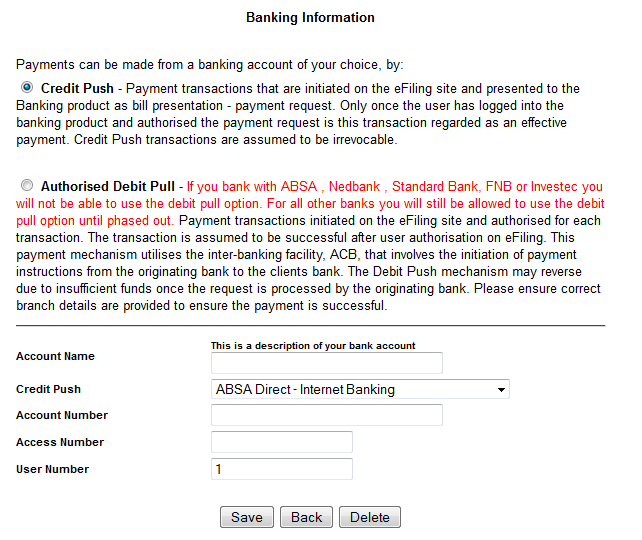
     
    Account Name: Put your own description here. Makes sense to use the same description you have on the account on your ABSA internet banking profile.

    Credit Push: I chose "ABSA Direct - Internet Banking". Seemed to work.

    Account Number: This is the ABSA bank account number from which you wish to pay.

    Access Number: This is the key - the "login" number you use when you log into ABSA internet banking. Usually this an ABSA bank account number as well but may well not be the one you are paying from!

    User Number: Usually 1 but it is possible to have multiple profiles on ABSA internet banking. I don't have this so I can't advise. I left it at 1. Presumably it is the same as what you fill in when you log into ABSA.

    Once you've set up the account, you then go to your assessment (IT34 or whatever) on the SARS site and choose to make payment. Choose credit push and then the bank account from the drop-down. The bank account you setup above should be there.

    The rest is fairly self explanatory. It should end with a message to the effect that a payment instruction had been created.

    Now... on the ABSA side... logon as usual and under payments, go to the bottom - "Authorisations". Choose the "Tax/UIF" tab and then you should see the pending authorisation. This could take a minute or two to arrive but you need to do this on the same day you created the request from SARS or it may expire.


    You then get the option to choose an account to pay from. I chose the one I setup on SARS E-filing. Weird that you have options here but anyway... then it's just a case of next, next, next until done. Voila.

Hope this helps someone.

James

Saturday, September 12, 2009

Fedora Core 11 installation

List of additional software I install after installing a new Fedora release, as well as tips and tricks for each if there are any.

1. Gnucash
2. Easytag
- useful for tagging mp3s
3. VLC
Media player
4. Kino
Video editor- Seems to work but I haven't fiddled much. At the moment my video plays very quickly in the preview.
5. Firefox
5.1 flash plugin
Adobe repository doesn't seem to be set up for yum and I'm battling to do it so I just went to:
http://get.adobe.com and downloaded the rpm there.
5.2 sun's java
I'm afraid the java version that comes with fedora / firefox doesn't run all java apps. Specifically, the online stock charting from standard bank (www.standardbank.co.za) that I use for stock analysis.
So get the latest download from the java site. This was jre-6u16-linux-i586.rpm when I got mine. install it (rpm -i jre-6u....).
You then need to set up the symbolic link in the firefox plugins-
ln -s /usr/java/jre1.6.0_16/plugin/i386/ns7/libjavaplugin_oji.so /usr/lib/mozilla/plugins/libjavaplugin.so
6 fdupes
yum -y install fdupes
This is a useful package for finding all your duplicate mp3s photos etc.
7 id3ed
I use this for command line mp3 tag editing and I have scripts that use this to rename mp3s according to their artist and title in order to standardise filenames.
Get the gzipped tar from http://freshmeat.net/projects/id3ed/
Then tar -zxvf id3ed-1.10.4.tar.gz
cd to the directory (cd id3ed-1.10.4)
./configure
make
make install
Had to modify the Makefile because it defaults the man files to /usr/local/man whereas they seem to bin /usr/share/man for FC11. So I hardcoded the following line in the Makefile from
mandir=${prefix}/man
to
mandir=/usr/share/man

and that worked.

Friday, April 4, 2008

Recycling in the capital


Well, we're not quite in the same league as Al Gore, but my wife and I do try to make some effort towards cutting down on our wasteful consumer-oriented impact on the environment.

We've got a decent system going to compost our organic waste and we try to recycle where possible.

Unfortunately this is a major uphill battle in the republic of sleepy hollow. We may be the city of choice but the services rendered for our rapidly escalating municipal rates are hardly addressing environmental issues.

Today the witness reported on a sewerage outflow into the Msunduzi river from one of the pump stations. That's right, the report claims raw sewerage is flowing straight into the river. Is there any outrage, are heads going to roll? Nope. There seems to be some concern and some gentle assurance that they'll address it but no-one seems overly perturbed.

If we don't pay our rates or taxes you can bet your life we'll be rapidly prosecuted and incarcerated but is there any consequence for allowing severe pollution of the environment we are paying the council to protect and manage? Naaah.

Sorry, I digressed. But back to the recycling issue.

It is a battle to recycle waste in this town. At one stage there was a paper pick-up where you could leave waste paper out on the verge on a certain day of the week but, sadly, this was discontinued. Apparently it wasn't supported enough by residents so it became unviable. That is really disappointing, but I can believe it. Apathy is rife.

Apart from that there is no collection service whatsoever for recycling. There are some "dump" points where you can take your glass and paper but these seem to be very poorly serviced. It is a mission to get all your recyclables to the spot and then when you arrive, half the time the bins are overflowing and obviously haven't been emptied for weeks.

Pathetic.

Perhaps it isn't commercially feasible to run these recycling points but one would think then, that the city would subsidise this. What a great way to reduce our landfill impact, reduce litter and create jobs? Obviously not a priority.

Above is a picture taken of the overflow of the glass recycling point at the Super Spar. Took time off during my lunch to take my glass there and had to return home with it because the point obviously hadn't been cleared for some time.

These bins have the name "reclaim" on them so presumably this is the organisation responsible for running the point. Get your act together guys, this is pathetic. And, Pietermaritzburg/Msunduzi council, you could also really get involved in a recycling drive. Give us *something* for our rates.

(P.S. The paper bin is mondi run but that was fine, no complaints there)

Sunday, March 30, 2008

Enable remote destop between Fedora Core 7 PCs

Some more handy tips for Fedora home users:

Enabling remote desktops at home.

1. I did this step first and I don't think it worked so leave it out next time but, having done it, I can't not document it in case it is critical.

I went to the System->Administration->Login window command from the main menu;
Went to the "Remote" tab;
Chose style- same as local;

Essentially, this was to allow remote login. Not sure if this was replaced by the steps below or augmented by them.

2. As per the helpful document in http://homepage.ntlworld.com/daniel.rigal/xdmvnc.html

# Edit /etc/X11/xdm/xdm-config. Comment out the last line saying:

DisplayManager.requestPort: 0

by adding an "!" on the front.

# Edit /etc/X11/xdm/Xaccess. Uncomment the line:

#* #any host can get a login window

by removing the first "#".

# The next file to edit depends on which XDM version you are using. For GDM based systems (e.g. RedHat) edit: /etc/X11/gdm/gdm.conf. For KDM based systems (e.g. FC7) edit: /usr/share/config/kdm/kdmrc. If unsure, editing both will do no harm.

In either case, find the section:

[Xdmcp]
Enable=false

Change "false" to "true" or "1".

Underneath this (i.e. somewhere inside the [Xdmcp] section), make sure you have a line which says:

Port=177

If it is commented out then uncomment it. If it says Port=0 then change it to say Port=177. If it is missing entirely then add it.

# You now need to restart the XDM/KDM/GDM process to make it notice the changes. The easiest way to do this is: "init 3; init 5". Note that this will crash any X desktop you (or any other users) are running on the machine at the time. If you prefer not to do this, you can kill and restart the processes manually.

3. Firewalls

On both systems, I enabled the following ports:

177 (UDP)
6000-6005 (TCP)

Sunday, March 23, 2008

Unpalatable self-centredness

Yawn.

My wife and I have just done our level best to sit through Al Gore's "An Inconvenient Truth".

Not what I expected at all. We had some preconceived ideas, and those were simply that this would be moving, impressive stuff. Everyone had raved about it.

What did I know of Al Gore before watching the movie? Only that he was beaten by Bush to the presidency. Precious little else so I definitely wasn't prejudiced.

What is our impression? Well, we weren't able to finish it. We just got sick and tired of what appeared to be Al Gore being more obsessed with getting his own picture on the camera, revelling in his own showmanship and presenting pseudo-science in what he supposed was a moving manner.

Look, we're hardly rabid environmentalists, but we're certainly not evil capitalist exploiters-at-all-costs either and have our own major problems with the Bush administration's policies on the environment.

But this was just too much baloney. Human induced global warming may well be true but I will not be moved by some guy that wants to squeeze into his film a teary moment when he was beaten to the presidency. Earlier on he was telling us about life changing events after his son's accident which changed his perspective on things; and then suddenly he seems to be trying to dig at Bush as if he never got over the election thing. GET OVER IT, Al! You yourself are telling us your life has changed and there are more important things than petty political squabbles.

What's more, you'd think after watching this that Al Gore was the guy that had introduced the world to the concept of global warming. We found the whole film amazingly self-centred. Pictures of Al musing about how he could save the planet are liberally interspersed among the badly presented "facts".

He shows a clip of some glacier calving and the commentry implies that we are witnessing glaciers retreating! Glaciers have always and will always calve where they enter the sea whether they're retreating or advancing. This is gross misrepresentation. Look, I'm not trying to say that the world's glaciers aren't retreating... I believe they are... but that doesn't justify misleading people by implying that what was shown in that clip is evidence of it. What it means is that either
a) Al Gore doesn't know about glaciers calving OR
b) He is deliberately misleading the audience.

Either of the above possibilities is equally damning and scary. And if there's one "fact" like this in the movie you can hardly trust the rest of the hastily drawn conclusions.

I can't comment on whatever the final conclusion was because I bailed somewhere during Al's reminiscences of life on the farm in his younger days.

Poor job, Mr Gore. Next time forget the pictures of yourself and try to get the facts down accurately and objectively with a little less bitterness about your political misfortunes.

Friday, March 21, 2008

SABC TV Tax

Dear Sir

Today I made payment for my television licence to the SABC. I wish to remind you that I
do this under the strongest possible duress. I pay only in order to abide by the law
which I consider draconian and oppressive.

I do not make use of the SABC at all and yet I am forced to subsidise this organisation
just because I have a television set which I use for watching DVDs and DSTV (pay)
stations.

The fact that there is a law which forces me to pay for services I do not use or want I
consider extortionate in the least.

I also object to the term "TV LICENCE". This is a tax like any other and should be named
as such.

I realise that you alone are not responsible for this deplorable state of affairs but I
do suggest you consider the moral aspect of your position in an organisation that uses
such extortionate means to obtain its revenue.

kind regards

Tuesday, March 18, 2008

Recovering Data via USB Housing

Just had a bit of a mission recovering data from my old hard drive and in the true spirit of open source and community support, I thought I'd publish the details here. Hopefully it gets indexed by google and someone having similar difficulties will find some answers or help from my experiences.

Data Recovery: Old Linux Drive into USB housing
===============================================

So my old computer gives up the ghost and I get a brand spanking new one. What to do about the data sitting on the old hard drive?

What was that? Yes, of course I had backups. And they worked. But one thing.... the only thing not in the
backup were my photos from our skiing trip. Downloaded seconds before the blasted thing crashed.

AFAIK the hard drive (and photos) were fine. So I thought I'd just plug it into my new computer and get the data off.

Except....

New computer is all SATA and old is IDE. No IDE connector!

So I order one of those external bays - you know, you for backups AND I can get my data off. Right?

Wrong- not so easy.

I plug the sucker in and FC7 automounts it... but it only mounts the boot partition. I forgot the thing was partitioned.

Uh oh.

So I unmount (using umount) that one from the command line and attempt to mount the correct (data) partition.

How do I know what it is? Well, running fdsik -l gives:
>>>>
Disk /dev/sdb: 80.0 GB, 80025279488 bytes
255 heads, 63 sectors/track, 9729 cylinders
Units = cylinders of 16065 * 512 = 8225280 bytes
Disk identifier: 0x00074b79

Device Boot Start End Blocks Id System
/dev/sdb1 * 1 13 104391 83 Linux
/dev/sdb2 14 9729 78043770 8e Linux LVM
>>>>

Aha! Then, /dev/sdb2 is what I'm after.

So I try
#mount /dev/sdb2 /media/main

no dice. I think it asked for an fstype at the time and I couldn't supply one that worked.

Turned out the problem is that the second partition above is not just Linux (ie ext2) but Linux LVM. This means it is a logical volume story.

So, the journey begins:

First, we run pvs to check out the physical volumes.

first time I ran pvs, the USB drive didn't show, so:

Ran pvs on /dev/sdb2
and it showed the good stuff:
>>>>>>
PV VG Fmt Attr PSize PFree
/dev/sdb2 VolGroup00 lvm2 a- 74.41G 32.00M
>>>>>
but, next time I ran pvs with no arguments:

>>>>>
WARNING: Duplicate VG name VolGroup00: Existing ynE4fb-efC3-Yqz2-gY9u-72rp-rEUf-N7iJgs (created here) takes precedence over 775r5u-IFr7-8Hlf-wMIS-ziFX-EBjW-YR3qVb
PV VG Fmt Attr PSize PFree
/dev/sda2 VolGroup00 lvm2 a- 232.62G 32.00M
/dev/sdb2 VolGroup00 lvm2 a- 74.41G 32.00M
>>>>>>

uh-oh: problems, they have the same VG name. But the gobbledegook after "Existing" in the line above is the UUID so we can use that and vgrename to rename the offensive (2nd) one to something better so...

with much trepidation:

#vgrename 775r5u-IFr7-8Hlf-wMIS-ziFX-EBjW-YR3qVb VolGroup00_tmp
>>>>>>>
WARNING: Duplicate VG name VolGroup00: Existing ynE4fb-efC3-Yqz2-gY9u-72rp-rEUf-N7iJgs (created here) takes precedence over 775r5u-IFr7-8Hlf-wMIS-ziFX-EBjW-YR3qVb
Volume group "VolGroup00" successfully renamed to "VolGroup00_tmp"
>>>>>

OK, seemed succesful.

Now when we pvs, we get:
>>>>>>
/dev/sda2 VolGroup00 lvm2 a- 232.62G 32.00M
/dev/sdb2 VolGroup00_tmp lvm2 a- 74.41G 32.00M
>>>>>>

phew. So far so good. Now we need to mount the bugger:

We try

#mount /dev/VolGroup00_tmp/LogVol00 /media/main

but somehow keep mounting the existing (Volgroup00) LogVol00 to this point. Not sure why.

So I decide to rename the logical volume (LogVol00) under the volume group VolGroup00_tmp to avoid lv naming confusion:

#lvrename /dev/VolGroup00_tmp/LogVol00 /dev/VolGroup00_tmp/newlv
>>>>>
Renamed "LogVol00" to "newlv" in volume group "VolGroup00_tmp"
>>>>>
OK, seems succesful.

Try to mount and it can't find /dev/VolGroup00_tmp/newlv. But I've just created it? What's up?

now run lvdisplay and you get, among other things:
>>>>>>
LV Name /dev/VolGroup00_tmp/newlv
VG Name VolGroup00_tmp
LV UUID BE6gLt-cTZD-1JKL-ADy5-ksLX-2Obv-gSB1Pm
LV Write Access read/write
LV Status NOT available
LV Size 73.62 GB
Current LE 2356
Segments 1
Allocation inherit
Read ahead sectors 0
>>>>>>

NOT available??? apparently you have to run vgchange -a y /dev/VolGroup00_tmp
and.....

2 logical volume(s) in volume group "VolGroup00_tmp" now active


So....

and now we can mount the bugger

mount /dev/VolGroup00_tmp/newlv /media/main/

Success!!